
Azure DevOps - CI/CD Pipeline involving Helm 3, ACR & AKS
Setup Continuous Integration in Azure DevOps which push Docker image, Helm 3 chart to ACR, and Continuous Deployment pipeline that deploys the chart to AKS.
commit a520699 · authored · amended · 7 min read

Azure is my favorite cloud provider. We use Azure for most of the infra & services. Our code goes to Azure DevOps, we use Azure Container Registry (ACR) to host our docker container images and our Kubernetes clusters running in Azure Kubernetes Service (AKS).
We configured the CI/CD pipelines in Azure DevOps. In my case, we have a monorepo that contains several ASP.NET Core microservices and the folder structure looks like below, which we inherited from eShopOnContainers.
- build  - azure-devops    - common      - ci-steps-template.yml      - ci-vars-template.yml    - project-one      - ci-pipeline.yml    - project-two- deploy
  - azure-devops    - common      - cd-steps-template.yml      - cd-steps-template-prod.yml      - cd-vars-template.yml    - project-one      - cd-pipeline.yml    - project-two  - k8s    - helm      - project-one      - project-two
- src  - Services    - Project-One    - Project-Two
One of the great articles that helped me to initial setup the CI/CD is given below.
Its kind of outdated now since it is using az acr helm commands which were deprecated later.
But it is still worth reading. So definitely check it out.
👉 Tutorial: Using Azure DevOps to setup a CI/CD pipeline and deploy to Kubernetes
CI Pipeline
The CI pipeline does the following,
- Build a Docker image and push to ACR
- Build Helm chart and push to ACR
Prerequisites
- Helm chart for your project. Here my chart directory is located at
deploy > k8s > helm. To create a new chart for your project, refer Helm Create. - acr-connection-name: ACR service connection in Azure DevOps. You can add it under
Azure DevOps > Project > Project Settings > Service Connections.
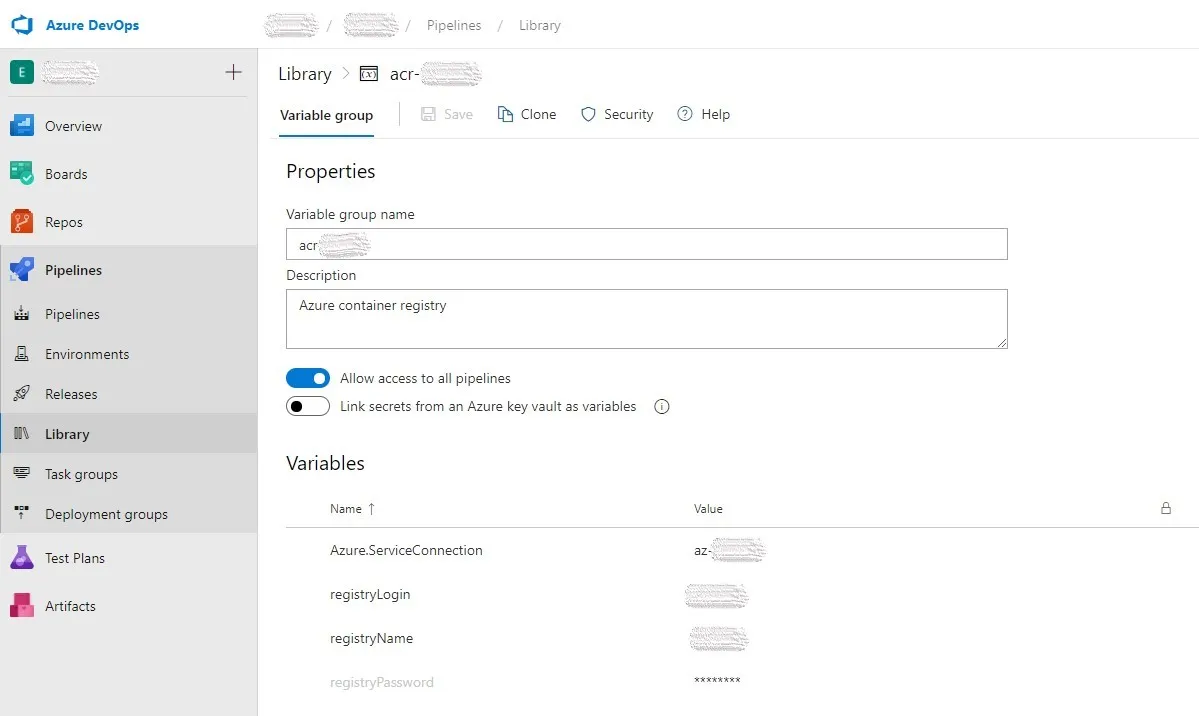
The ACR credentials I stored in the Azure DevOps Variable Groups (acr-variable-group).
| Name | Value |
|---|---|
| registryName | Your ACR name |
| registryLogin | ACR login |
| registryPassword | ACR password |
Common
ci-vars-template.yml
parameters:  projectName: ""  dockerRegistryServiceConnectionName: ""  dockerfile: ""  buildContext: ""
variables:  helmVersion: 3.2.3  HELM_EXPERIMENTAL_OCI: 1  registryServerName: "$(registryName).azurecr.io"  dockerRegistryServiceConnectionName: ${{ parameters.dockerRegistryServiceConnectionName }}  dockerfile: ${{ parameters.dockerfile }}  buildContext: ${{ parameters.buildContext }}  projectName: ${{ parameters.projectName }}  imageName: ${{ parameters.projectName }}  imageTag: $(build.sourceBranchName)  helmChartVersion: $(build.sourceBranchName)  helmfrom: $(Build.SourcesDirectory)/deploy/k8s/helm  helmto: $(Build.ArtifactStagingDirectory)/deploy/k8s/helm
Few things to note here,
HELM_EXPERIMENTAL_OCIis to enable OCI support in the Helm 3 client. Currently, this support is experimental.build.sourceBranchNameas the image tag and chart version is handy if you are following Gitflow (which we follow) or similar git branching convention, so each release (eg, refs/tags/project-one/2.2.6) will generate Docker image and Helm chart with the same version.
ci-steps-template.yml
steps:  - task: Docker@2    displayName: Build and push an image to container registry    inputs:      command: buildAndPush      repository: $(imageName)      dockerfile: $(dockerfile)      containerRegistry: $(dockerRegistryServiceConnectionName)      buildContext: $(buildContext)      tags: |        $(imageTag)
  - task: HelmInstaller@1    displayName: "install helm"    inputs:      helmVersionToInstall: $(helmVersion)  - bash: |      echo $(registryPassword) | helm registry login $(registryName).azurecr.io --username $(registryLogin) --password-stdin      cd deploy/k8s/helm/      helm chart save $(helm package --app-version $(imageTag) --version $(helmChartVersion) ./$(projectName) | grep -o '/.*.tgz') $(registryName).azurecr.io/charts/$(projectName):$(imageTag)      helm chart push $(registryName).azurecr.io/charts/$(projectName):$(helmChartVersion)      echo $(jq -n --arg version "$(helmChartVersion)" '{helmChartVersion: $version}') > $(build.artifactStagingDirectory)/variables.json    failOnStderr: true    displayName: "helm package"  - task: CopyFiles@2    inputs:      sourceFolder: $(helmfrom)      targetFolder: $(helmto)  - publish: $(build.artifactStagingDirectory)    artifact: build-artifact
The steps in the CI pipeline we moved to a common template file ci-steps-template.yml so that we can reuse it on other pipelines as well, and the steps include,
-
Build and push the docker image
-
Installs Helm client
-
A series of script which does
- Authenticate to ACR
- Creates and push Helm chart to ACR.
- Creates
variables.jsonwhich contain the newly created Helm chart version. Which we will use to fetch the right chart version during CD.
-
Copy some additional files to the artifact. Which we can use to override Helm chart values.
ci-pipeline.yml
trigger:  branches:    include:      - refs/tags/project-one/*  paths:    include:      - src/Services/ProjectOne/*
pr: none
pool:  vmImage: "ubuntu-latest"
variables:  - group: acr-variable-group  - template: ../common/ci-vars-template.yml    parameters:      projectName: "project-one"      dockerRegistryServiceConnectionName: "acr-connection-name"      dockerfile: "src/Services/Project-One/Dockerfile"      buildContext: "$(System.DefaultWorkingDirectory)"
steps:  - template: ../common/ci-steps-template.yml
If everything went well, you will have two repositories under your ACR.
- project-one which contains the Docker image
- chart/project-one for the Helm chart
CD Pipeline
The CD pipeline will install the Helm chart on AKS. The CD pipeline stage requires following details,
| Name | Value |
|---|---|
| aks | AKS name |
| rg | AKS resource group |
| aksSpTenantId | Subscription tenant id |
| aksSpId | Service principal Id |
| aksSpSecret | Service principal password |
These credentials I stored in another varible group named aks-variable-group.
Helpful commands
Service principal credentials
Create new service principal aks-name-deploy by
az ad sp create-for-rbac -n aks-name-deploy --scopes aks-resource-id --role "Azure Kubernetes Service Cluster User Role" --query password -o tsvWhere aks-resource-id is,
az aks show -n $aks -g $rg --query id -o tsvThe above command will output service principal password aksSpSecret.
To get service principal id aksSpId,
az ad sp show --id http://aks-name-deploy --query appId -o tsvAlso we need to attach ACR with AKS so that AKS can pull our private docker images from our ACR.
Attach ACR with AKS
az aks update -g $rg -n $aks --attach-acr acr-resource-idWhere acr-resource-id is the output of,
az acr show -n $registryName -g acr-resource-group-name --query id -o tsvGet Azure Tenant Id
To get tenantId aksSpTenantId,
az account show --query tenantId -o tsvNow lets explore the pipeline YAML files.
Common
cd-vars-template.yml
parameters:  projectName: ""
variables:  helmVersion: 3.2.3  HELM_EXPERIMENTAL_OCI: 1  registryServerName: "$(registryName).azurecr.io"  projectName: ${{ parameters.projectName }}
cd-steps-template.yml
steps: - checkout: none - task: HelmInstaller@1 displayName: "install helm" inputs: helmVersionToInstall: $(helmVersion) - download: ci-pipeline artifact: build-artifact - bash: | az login \ --service-principal \ -u $(aksSpId) \ -p '$(aksSpSecret)' \ --tenant $(aksSpTenantId) az aks get-credentials \ -n $(aks) \ -g $(rg) echo $(registryPassword) | helm registry login $(registryServerName) --username $(registryLogin) --password-stdin helmChartVersion=$(jq .helmChartVersion $(pipeline.workspace)/ci-pipeline/build-artifact/variables.json -r) helm chart pull $(registryServerName)/charts/$(projectName):$helmChartVersion helm chart export $(registryServerName)/charts/$(projectName):$helmChartVersion --destination $(pipeline.workspace)/install helm upgrade \ --namespace $(k8sNamespace) \ --create-namespace \ --install \ --wait \ --version $helmChartVersion \ --set image.repository=$(registryServerName)/$(projectName) \ -f $(pipeline.workspace)/ci-pipeline/build-artifact/deploy/k8s/helm/app.yaml \ -f $(pipeline.workspace)/ci-pipeline/build-artifact/deploy/k8s/helm/inf.yaml \ $(projectName) \ $(pipeline.workspace)/install/$(projectName) failOnStderr: true displayName: "deploy helm chart"The common CD steps include a series of script which does,
- Authenticate to Azure using the service principal credentials
- Set the specified AKS cluster as the context.
- Authenticate ACR with the ACR credentials (The same credentials we used in CI pipeline defined in the
acr-variable-group) - Extract the Helm chart version that need to install
- Pulls the Helm chart and installs (or upgrade) it. Here we are overriding the chart image repository to our ACR repository and some additional common values (app.yaml & inf.yaml).
cd-pipeline.yml
trigger: nonepr: none
# define variables: registryName, registryLogin and registryPassword in the Azure pipeline UI definitionvariables:  - group: acr-variable-group  - template: ../common/cd-vars-template.yml    parameters:      projectName: "project-one"  - name: k8sNamespace    value: myteam
resources:  pipelines:    - pipeline: ci-pipeline      source: "project-one-ci"      trigger:        enabled: true        branches:          include:            - refs/tags/project-one/*
# define 5 variables: aks, rg, aksSpId, aksSpSecret and aksSpTenantId in the Azure pipeline UI definitionstages:  - stage: test    displayName: test    jobs:      - deployment: test        variables:          - group: aks-variable-group        displayName: deploy helm chart into AKS        pool:          vmImage: ubuntu-latest        environment: test-$(projectName)        strategy:          runOnce:            deploy:              steps:                - template: ../common/cd-steps-template.yml  - stage: production    displayName: production    jobs:      - deployment: production        variables:          - group: aks-prod-variable-group        displayName: deploy helm chart into AKS        pool:          vmImage: ubuntu-latest        environment: production-$(projectName)        strategy:          runOnce:            deploy:              steps:                - template: ../common/cd-steps-template-prod.yml
In the CD pipeline above, I have defined two stages, one for TEST and one for PROD.
The main difference between them is in the variable group used.
aks-variable-group has the TEST cluster values and you guessed right, aks-prod-variable-group has the PROD cluster values.
And the difference between cd-steps-template.yml and cd-steps-template-prod.yml is that prod file has some additional chart value overrides with respect to our PRODUCTION environment.
cd-steps-template-prod.yml
steps: - checkout: none - task: HelmInstaller@1 displayName: "install helm" inputs: helmVersionToInstall: $(helmVersion) - download: ci-pipeline artifact: build-artifact - bash: | az login \ --service-principal \ -u $(aksSpId) \ -p '$(aksSpSecret)' \ --tenant $(aksSpTenantId) az aks get-credentials \ -n $(aks) \ -g $(rg) echo $(registryPassword) | helm registry login $(registryServerName) --username $(registryLogin) --password-stdin helmChartVersion=$(jq .helmChartVersion $(pipeline.workspace)/ci-pipeline/build-artifact/variables.json -r) helm chart pull $(registryServerName)/charts/$(projectName):$helmChartVersion helm chart export $(registryServerName)/charts/$(projectName):$helmChartVersion --destination $(pipeline.workspace)/install helm upgrade \ --namespace $(k8sNamespace) \ --create-namespace \ --install \ --wait \ --version $helmChartVersion \ --set image.repository=$(registryServerName)/$(projectName) \ -f $(pipeline.workspace)/ci-pipeline/build-artifact/deploy/k8s/helm/app.yaml \ -f $(pipeline.workspace)/ci-pipeline/build-artifact/deploy/k8s/helm/inf.yaml \ -f $(pipeline.workspace)/ci-pipeline/build-artifact/deploy/k8s/helm/inf-prod.yaml \ -f $(pipeline.workspace)/ci-pipeline/build-artifact/deploy/k8s/helm/$(projectName)/values-prod.yaml \ $(projectName) \ $(pipeline.workspace)/install/$(projectName) failOnStderr: true displayName: "deploy helm chart"Few more Notes
- CD pipeline is also YAML based (You gonna like it), hence create it like a regular pipeline (Not as RELEASE) in the Azure DevOps, and choose the
cd-pipeline.ymlafter choosing to create pipeline based on Existing Azure Pipelines YAML file. - Once you create the CD pipeline, check the Environments under Azure DevOps Pipelines. There will be two environments as per the above example, test-project-one and production-project-one. Inside each, you can configure the approvals and more for the respective CD stages.
A sample reference source code is also pushed to here.
If you have any grey area in this article, feel free to shoot it in the comments below 👇, I will try to shed some light on that part.
Setup Continuous Integration in Azure DevOps which push Docker image, Helm 3 chart to Azure Container Registry(ACR), and Continuous Deployment pipeline that deploys the chart to Azure Kubernetes Service (AKS).https://t.co/S96mzQXn4M#AzureDevOps #helm #Kubernetes
— Abhith Rajan (@AbhithRajan) August 21, 2020